The secretary’s job, without the scramble
Anyone who has taken minutes for an HOA, a condo association, a nonprofit or a school board knows the problem. You are expected to take part in the discussion and, at the same moment, write down the exact wording of a motion, who moved it, who seconded it and how the vote went. Weeks later someone asks who seconded it, and the notes don’t say.
Recapvo listens for you. Put your iPhone on the table, show the consent card, and run the meeting. When you stop, choose formal minutes and Recapvo drafts them from the transcript.
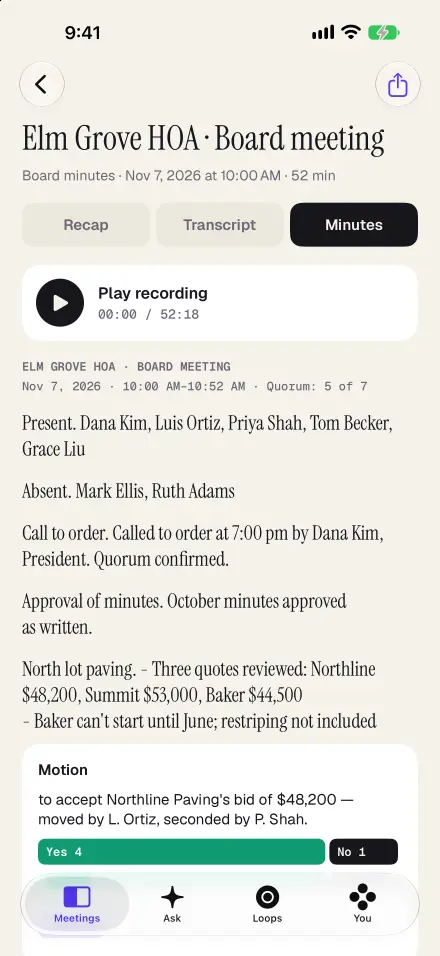
What the minutes include
- Header: the meeting name, date, start time and length.
- Attendance: who was present and who was absent, and whether quorum was confirmed.
- The meeting in order: call to order, approval of the previous minutes, reports and a section for each agenda item.
- Motions: the motion as stated, the mover, the seconder, the yes, no and abstain counts, and the result.
- Action items: what was assigned, to whom, and by when.
- Tabled and parked items: agenda items you didn’t reach carry over, and Recapvo offers them when you set up the next agenda.
The minutes are a draft for you to edit. When the board approves them, mark them approved; if anyone edits them later, they go back to draft, so the approved version is never changed by accident.
Check any line against the recording
AI drafts can be wrong, so Recapvo doesn’t ask you to trust them. Every decision and action links to its moment: tap it and hear the exact words. You can also ask: “Who seconded the paving motion?” or “What did we decide about the gate code?” The answer comes from your recordings and cites the moments you can play.
During the meeting
- Agenda timer. Load the agenda before the meeting; a chip shows the current item and turns amber when the room runs over.
- One-tap marks. Mark a decision or an action as it happens, on the iPhone or from an Apple Watch.
- Captions for the room. Large type with each speaker’s name in colour, for members who are hard of hearing. Captions can be translated on the device.
- Room Link. At a long table, a second member’s iPhone can join as a microphone by scanning a code. Nothing to install.
After the meeting
Export the minutes as Word or PDF for the association’s records, or send a branded recap email to the board. Open loops tracks every action item across meetings, and the Pre-Meeting Brief before your next board meeting lists what’s still open, so “we’ll circle back” actually gets circled back to.
Private by default
The audio stays on your iPhone. Transcription and speaker naming run on the device; when you make minutes, only the transcript text is sent to write them. There is no account to create.
Rules for recording meetings, and for what minutes must contain, depend on your state, your bylaws and whether the meeting is open to members. Recapvo helps you ask for consent and draft the minutes; your board decides what it approves as the official record.
Screens show the real app with example data.