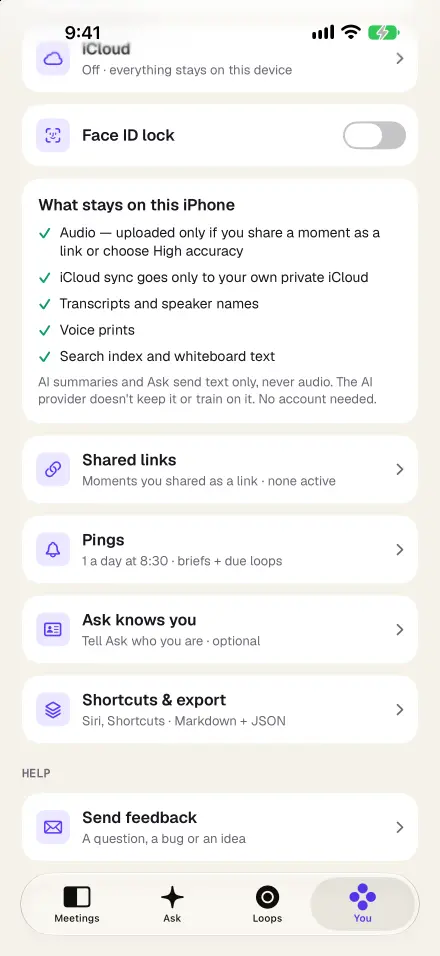
Privacy, explained plainly
Session conversations are among the most sensitive things anyone can record. So here is exactly what happens, without marketing language:
- The audio stays on your iPhone, and in your own private iCloud only if you turn on sync. We never receive it.
- Transcription, speaker naming and search run on the device.
- When you ask for a summary or ask a question, the relevant transcript text, never audio, is sent through our server to our AI provider to write the answer. Our server doesn’t store it, and it isn’t used to train models.
- High-accuracy transcription is optional and off by default. Only if you switch it on for a specific session is that session’s audio sent once for a more accurate transcript. Leave it off and the audio never leaves.
- Sharing is always your choice. Nothing is shared unless you export it or pick a single moment to share.
- No account, and Face ID can lock the app. Old audio can delete itself while your notes stay.
Consent first, every time
Before every recording, Recapvo shows a consent card or reads a notice aloud; for therapy and coaching sessions the read-aloud notice comes first, so you don’t have to hand your phone across the room. Who agreed, and when, is saved with the session. If a client says no, you simply don’t record. Recapvo can’t verify that someone agreed; that conversation is yours to have.
Quiet by design for one-to-one sessions
Recapvo has built-in therapy and coaching templates. The in-meeting prompts that make sense in a business meeting, such as talk balance, repeated promises and who hasn’t spoken, are off by default for therapy and coaching, so nothing on the screen competes with your client.
If you want to note something without breaking eye contact, hold the side-note button or whisper to your Apple Watch. Side notes are private: only you see them, pinned to the moment, and they never appear in recaps, exports or anything you share.
After the session
- A draft you edit. The therapy or coaching template turns the transcript into a recap you can correct and rewrite in your own words.
- Commitments, tracked. Things you or your client agreed to do between sessions appear as open loops with dates.
- Ask across sessions. “When did the new job first come up?” The answer cites the moments, and you can play them back.
- Your records system stays yours. Export to PDF, Word, Markdown or plain text and copy what you need into the system you already use.
What Recapvo is not
Recapvo is a recorder and note-taking app. It is not an electronic health record, it doesn’t give clinical advice, and we make no claim of HIPAA compliance or any other certification. Whether, and how, you may record sessions depends on your profession’s rules, where you practise and your client’s informed consent. Please check those before using it with clients.
Screens show the real app with example data.