The short answer
If most of your meetings are video calls, Otter’s notetaker joins Zoom, Microsoft Teams and Google Meet to write and share notes (Otter pricing page); Recapvo deliberately doesn’t. If most of your meetings happen at a table, on a site or in a classroom, Recapvo is made for exactly that, and it keeps the audio on your iPhone.
Side by side
| Otter.ai | Recapvo | |
|---|---|---|
| Made for | Online meetings and recordings; joins Zoom, MS Teams and Google Meet to automatically write and share notes | In-person meetings; never joins calls and never records phone calls |
| Devices | iOS and Android apps; web and mobile recording | iPhone (iOS 26 or later), iPad, iPhone Duo, Apple Watch; no Android |
| Free plan | Basic: 300 monthly transcription minutes, 30 minutes max per conversation | Free at launch with everything included, no limits, no length limit |
| Transcription languages | English, Spanish, French, German, Japanese and Chinese | Languages your iPhone supports for on-device speech, with automatic switching inside one meeting; app in 46 languages |
| Speakers | Speaker identification (by name) | Voice Names, on the iPhone |
| Asking questions | AI Chat within and across meetings | Ask across meetings; answers cite the exact moments, which you can play |
| Exports | Basic: mp3, txt; paid plans add pdf, docx, srt | PDF, Word, Markdown, TXT, SRT and audio, all included |
Otter details are quoted from otter.ai/pricing, checked November 9, 2026. Plans change; check Otter’s site for current details.
What Recapvo does differently
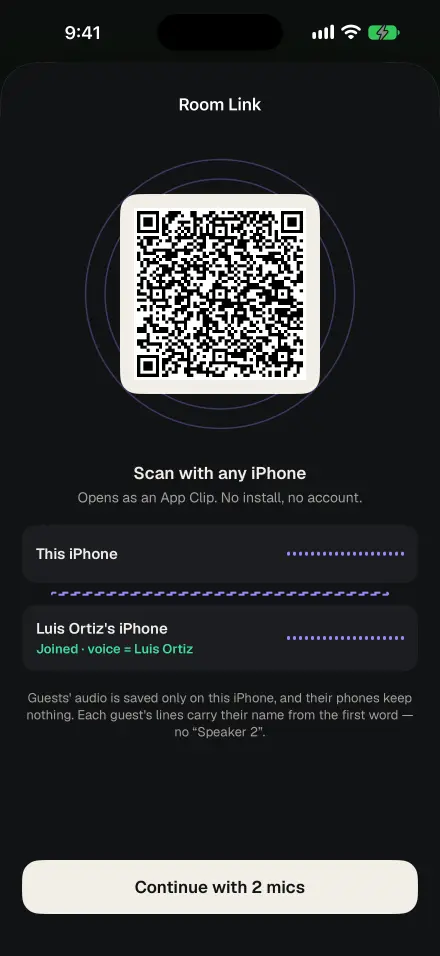
- In the room, first. A consent card before every recording, Room Link to add a second iPhone as a microphone, captions for the room, and one-tap marks from Apple Watch.
- On the device. Transcription, speaker naming and search run on your iPhone. Summaries and Ask send transcript text only, never audio, and only when you ask. High-accuracy transcription is opt-in, one meeting at a time.
- Answers with proof. Every answer in Ask cites the moments it came from; tap one to hear the exact seconds of audio.
- Never-Lose recording. Audio is saved every five seconds and recovered after a crash, a call or a dead battery.
- Meetings that need minutes. Formal minutes with motions and votes for boards and HOAs, open loops across meetings, and a Pre-Meeting Brief.
When Otter is the better choice
Choose Otter, or a tool like it, if your meetings are mostly on Zoom, Teams or Google Meet, if you or your team use Android, or if you need the team features Otter lists, such as shared channels and syncing notes to Salesforce or HubSpot. Recapvo does none of those, on purpose.
Using both
Plenty of people will use an online notetaker for calls and Recapvo for the room. If you have an audio file you want in Recapvo, such as an MP3, import it from Files and it gets a transcript, speakers, a recap and Ask.
Screens show the real app with example data.