What Voice Memos does well
According to Apple’s iPhone User Guide, Voice Memos lets you use iPhone as a portable recording device for personal notes, classroom lectures, musical ideas and more, with editing tools like trim, replace and resume (Make a recording in Voice Memos). With Voice Memos turned on in iCloud, recordings appear on your iPhone, iPad and Mac signed in to the same Apple Account.
Voice Memos can transcribe speech while you record or afterwards, on iPhone 12 or later in English, Spanish, Portuguese, Italian, French, German, Japanese, Korean, Simplified Chinese and Traditional Chinese, though not in all countries or regions. You can search titles and transcriptions, and with Apple Intelligence on supported iPhones you can use Writing Tools to summarize a transcript (View a Voice Memos transcription).
It’s already on your phone. For a quick voice note or a song idea, it’s hard to beat.
What Recapvo adds when other people are in the room
- Who said what. Every line is labelled by speaker, and Voice Names recognises people you’ve named before, on the iPhone.
- Consent built in. A consent card or a notice read aloud before every recording, saved with the meeting.
- Notes that fit the meeting. A recap with decisions and action items, owners and due dates, each linked to its moment, plus templates for 1:1s, site visits, interviews, lectures, doctor visits, sermons and formal board minutes with motions and votes.
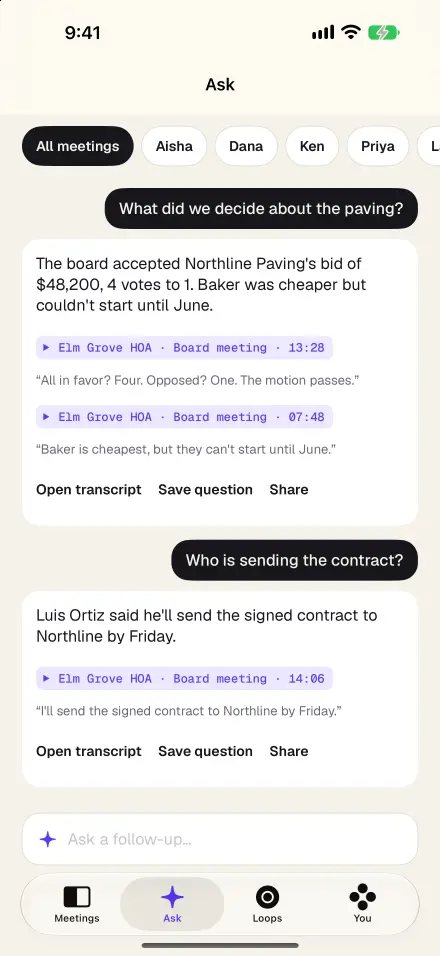
- Ask with proof. Ask across all your meetings in plain English; answers cite the exact moments, which you can play.
- Follow-through. Open loops tracks every promise across meetings, a Pre-Meeting Brief prepares you for the next one, and Catch Me Up recaps the last few minutes if you step out.
- During the meeting. One-tap marks from iPhone or Apple Watch, private side notes, captions for the room translated on the device, and Room Link to add a second iPhone as a microphone.
- Never-Lose recording. Saved every five seconds and recovered automatically after a crash, a call or a dead battery.
Side by side
| Voice Memos | Recapvo | |
|---|---|---|
| Transcription | Live or after recording, iPhone 12 or later, in the languages Apple lists | Live and after, on the iPhone, in the languages your iPhone supports for on-device speech, with automatic switching inside one meeting |
| Search | Titles and transcriptions | Transcripts, decisions and whiteboard text, plus Ask with cited moments |
| Summaries | Writing Tools with Apple Intelligence on supported iPhones | Recap, decisions, action items and formal minutes, every point linked to its moment |
| Sync | iCloud, across iPhone, iPad and Mac | Optional sync to your own private iCloud |
Voice Memos details are from Apple’s iPhone User Guide (recording, transcription), checked November 9, 2026.
Already have meetings in Voice Memos?
Open a recording in Recapvo from Voice Memos, or import any audio or video file from Files. Recapvo turns it into a meeting with a transcript, speaker labels, a recap and Ask, all on the same footing as one you recorded in the app.
Which should you use?
For a note to yourself, a lecture you just want to keep, or a melody, Voice Memos does the job. For a conversation with other people where you’ll need to know who said what, what was decided and who promised what by when, use Recapvo. Many people will keep both.
Screens show the real app with example data.