Why a recorder built for in-person meetings
Most meeting tools are built for video calls: a bot joins Zoom and takes notes. The meetings that happen around a table, on a job site, in a classroom or in a client’s office have no bot to invite, so they usually go unrecorded and half remembered.
Recapvo is built for those rooms. It records the people in front of you, with their agreement, on the iPhone in your hand. It never joins online calls and never records phone calls; if a call comes in, the recording pauses and picks up again afterwards.
What happens when you tap record
- A consent card comes first. Show it to the table or have Recapvo read a notice aloud. Who agreed, and when, is saved with the meeting.
- The recording can’t be lost. Audio is written to the iPhone every five seconds and recovered automatically after a crash, a call or a dead battery. It records for hours with the screen locked, with no length limit and no “save” step.
- You stay in the conversation. Mark a decision, an action or something important with one tap on the iPhone, the Lock Screen or Apple Watch. Park a tangent for later. Snap the whiteboard and the photo is pinned to that moment, its text read on the iPhone.
- Late or distracted? Catch Me Up gives you a three-line recap of the last few minutes, just for you.
After the meeting: a recap you can check
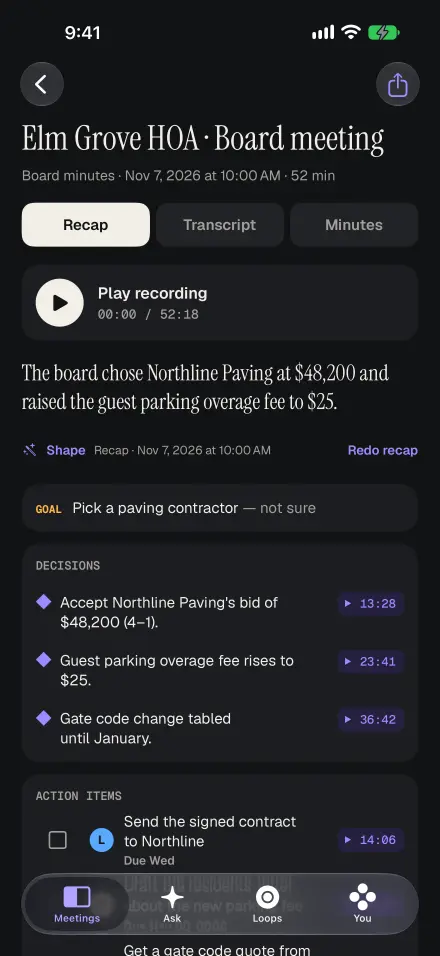
When you stop, you get a summary, the decisions, and action items with owners and due dates. Every point links to its moment in the recording, so you can tap it and hear what was actually said instead of trusting a paraphrase. Templates fit the meeting: 1:1s, client and site visits, interviews, lectures, doctor visits, sermons and small groups, plus formal minutes with motions and votes for boards.
Share it the way people actually read things: a branded recap email, PDF, Word, Markdown, plain text, SRT subtitles or the audio. Colleagues who use Recapvo can open the whole meeting from a .recapvo meeting file.
Ask any meeting. Hear the proof.
Ask in plain English: “What did we decide about the budget?” or “What did I promise Dana?” Answers come only from your recordings and cite the exact moments; tap a citation to hear the clip. Ask works across every meeting you’ve recorded, so the question doesn’t have to start with remembering which meeting it was.
Open loops collects every promise across meetings, with owners and dates, and you can send them to Reminders. Before your next meeting with the same people, a Pre-Meeting Brief lists what’s still open and what you parked.
Who said what, without typing names
Name a voice once and Voice Names recognises it in future meetings, on your iPhone. Forget any voice in one tap. For a long table, Room Link turns a colleague’s iPhone into a second microphone: they scan a code, it opens as an App Clip, and nothing needs installing.
Private by default
Transcription, speaker naming and search run on the iPhone. When you ask for a summary or an answer, only the transcript text is sent to write it, never the audio. High-accuracy transcription is optional and off unless you switch it on for a meeting. There is no account to create, and Face ID can lock the app.
Your languages, every device
The app is available in 46 languages, and Recapvo follows language switches inside one meeting automatically. Captions for the room can be translated on the device. Recapvo runs on iPhone with iOS 26 or later, with layouts for iPad and iPhone Duo and an Apple Watch app to start, mark and dictate.
It’s free at launch with everything included: no subscription, no limits. Pre-order now and it installs itself on launch day, May 7, 2027.
Screens show the real app with example data.