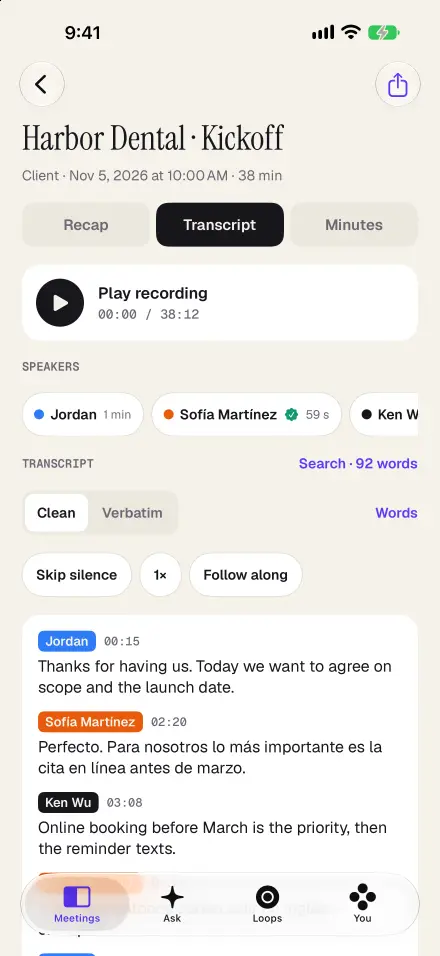
Speaker-labelled transcripts, made on your iPhone
Recapvo separates the voices in the room and labels every line by speaker, on the device. Name a voice once with Voice Names and, if that person agrees to be remembered, Recapvo recognises them in later interviews. Forget any voice in one tap. Each speaker gets a colour, and you can see how long each person talked.
Verbatim when it matters, clean when you read
Clean Voice gives you a readable transcript without the ums and false starts, and spells your names and terms the way you tell it to. It never edits the verbatim transcript: the exact words, with word-level timing, are always one tap away. Tap any word to play from there, follow along as it plays, skip silence, or listen at 1.5× or 2×.
Find the quote fast
Search every transcript, or ask: “Where did she talk about the funding gap?” The answer cites the moments, and you can tap to hear them. When you find the line, share it as a quote card: an image with the words, the speaker and a 10-second clip, as a card with audio, audio only or text only. A speaker’s name appears only if their voice was remembered with their agreement; otherwise the card says “A speaker”.
If you choose “Share as link” for one moment, Recapvo uploads only that clip of 10 seconds or less, for a page that expires after 7 or 30 days. Everything else stays on your iPhone.
Export for your workflow
- SRT subtitles with speaker names, for video editing.
- Word, PDF, Markdown and plain text transcripts.
- The audio as an M4A file.
Interviews in two languages
When an interview moves between languages, Recapvo picks up each one automatically and tags every line, so you can sort the transcript by language. The app is available in 46 languages.
In person only, with consent
Recapvo records the people in the room, after a consent card or a notice read aloud; the consent record is saved with the interview. It never records phone calls and doesn’t join video calls. If you already have a recording, import the audio or video file from Files or Voice Memos and you get the same transcript and tools.
Screens show the real app with example data.